You are viewing an unreleased or outdated version of the documentation
Dagster Pipes details and customization#
Dagster Pipes is a protocol for interfacing Dagster with an arbitrary external compute environment. While many users will be well-served by the simplified interface offered by our Pipes client objects (e.g. PipesSubprocessClient, PipesDatabricksClient), others will need a greater level of control over Pipes. This is particularly the case for users seeking to connect large existing codebases to Dagster.
This guide will cover the lower level Pipes APIs and how you can compose them to provide a custom solution for your data platform.
Overview and terms#
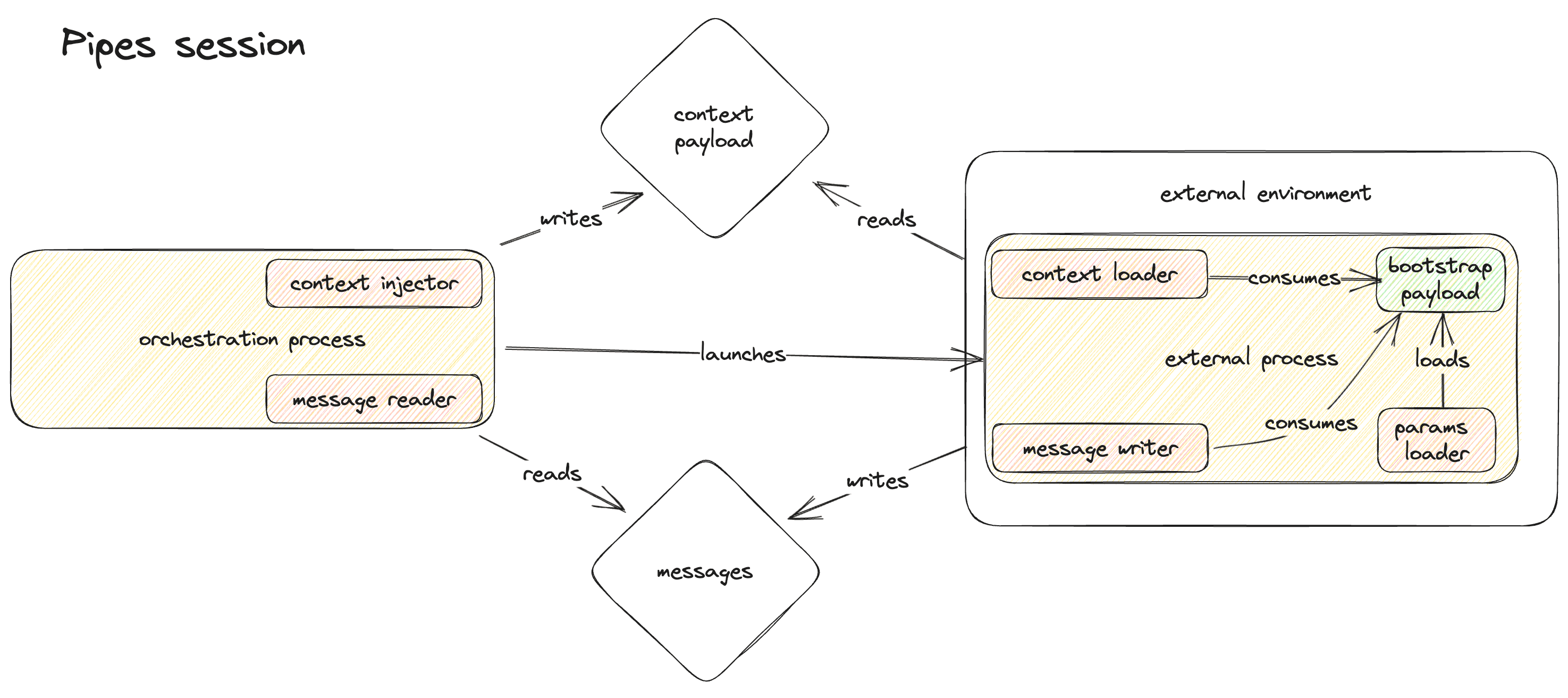
| Term | Definition |
|---|---|
| External environment | An environment external to Dagster, for example: Databricks, Kubernetes, Docker |
| Orchestration process | A process running Dagster code to materialize an asset or execute an op. |
| External process | A process running in an external environment, from which logs and events are reported back to the orchestration process. The orchestration process launches the external process |
| Bootstrap payload | A small bundle of key/value pairs that is written by the orchestration process to some globally accessible key-value store in the external process. Typically the bootstrap payload will be written in environment variables, but another mechanism may be used for external environments that do not support setting environment variables. |
| Context payload | A JSON object containing information derived from the execution context (OpExecutionContext or AssetExecutionContext ) in the orchestration process. This includes in-scope asset keys, partition keys, etc. The context payload is written by the orchestration process to some location accessible to the external process. The external process obtains the location of the context payload (e.g. an object url on Amazon S3) from the bootstrap payload and reads the context payload. |
| Messages | JSON objects written by the external process for consumption by the orchestration process. Messages can report asset materializations and check results as well as trigger orchestration-side logging. |
| Params loader | An entity in the external process that reads the bootstrap payload from some globally accessible key-value store. The default params loader reads the bootstrap payload from environment variables. |
| Context injector | An entity in the orchestration process that writes the context payload to an externally accessible location and yields a set of parameters encoding this location for inclusion in the bootstrap payload. |
| Context loader | An entity in the external process that loads the context payload from the location specified in the bootstrap payload. |
| Message reader | An entity in the orchestration process that reads message from an externally accessible location and yields a set of parameters encoding this location in the bootstrap payload. |
| Message writer | An entity in the external process that writes messages to the location specified in the bootstrap payload. |
Pipes session lifecycle (orchestration process)#
A pipes session is the time spanning:
- The creation of communications channels between the orchestration and external process;
- The launching and terminating of the external process;
- The processing of all messages reported by the external process and the closing of communications channels.
Pipes sessions are created in the orchestration process with the open_pipes_session context manager. This function is exported by dagster and should be called inside of an asset or op compute function - somewhere where an OpExecutionContext or AssetExecutionContext is available:
### ORCHESTRATION PROCESS

from dagster import (
    AssetExecutionContext,
    PipesResult,
    PipesTempFileContextInjector,
    PipesTempFileMessageReader,
    asset,
    open_pipes_session,
)

@asset
def some_pipes_asset(context: AssetExecutionContext) -> Iterator[PipesResult]:
    with open_pipes_session(
        context=context,
        extras={"foo": "bar"},
        context_injector=PipesTempFileContextInjector(),
        message_reader=PipesTempFileMessageReader(),
    ) as pipes_session:

        # Get the bootstrap payload encoded as a Dict[str, str] suitable for passage as environment
        # variables.
        env_vars = pipes_session.get_bootstrap_env_vars()

        # This function is responsible for launching the external process with the passed
        # `env_vars`. Note that `external_process` here does not represent an instance of a class
        # provided by Dagster Pipes. It is a representation of an arbitrary external process, the
        # API details of which will vary depending on the targeted external environment.
        external_process = launch_some_external_process(env_vars)

        # Continually poll the external process and stream any incrementally received messages back
        # to Dagster
        while not is_external_process_done(external_process):
            yield from pipes_session.get_results()

    # Yield any remaining results received from the external process.
    yield from pipes_session.get_results()
Above we see that open_pipes_session takes four parameters:
context: An execution context (OpExecutionContextorAssetExecutionContext) that will be used to derive the context payload.extras: A bundle of arbitrary extras in the form of a JSON-serializable dictionary. This is slotted into the context payload. It should contain any other information from the orchestration process that you want to expose to the external process.context_injector: A context injector, responsible for writing the serialized context payload to some location and expressing that location as bootstrap parameters readable by the external process. Above we used the built-in (and default)PipesTempFileContextInjector, which writes the serialized context payload to an automatically created local temp file and exposes the path to that file as a bootstrap parameter.message_reader: A message reader, responsible for reading streaming messages written to some location, and expressing that location as bootstrap parameters readable by the external process. Above we used the built-in (and default)PipesTempFileMessageReader, which tails an automatically created local temp file and exposes the path to that file as a bootstrap parameter.
Python context manager invocations have three parts:
- An opening routine (
__enter__, executed at the start of awithblock); - A body, containing user code;
- A closing routine (
__exit__, executed at the end of awithblock.
For open_pipes_session, these three parts perform the following:
- Opening routine: Writes the context payload and starts a thread to read messages. This may involve the creation of temporary resources, such as a temporary file (locally or on some remote system) for the context payload or a temporary directory to which messages will be written.
- Body: The external process should be launched, polled, and terminated here. This is also the place where intermediate results can be yielded to Dagster.
- Closing routine: Ensures that all messages written by the external process have been processed and cleans up any resources used by the context injector and message reader
Pipes session lifecycle (external process)#
In order to work with Dagster Pipes, an external process needs to be launched by a Dagster orchestration process. The orchestration process must inject a bootstrap payload into the environment of the launched external process. The user code in the external process must load a Dagster Pipes integration library. This library knows how to interpret the bootstrap payload and spin up a context loader and message writer.
At present the only official Dagster Pipes integration library is Python’s dagster-pipes, available on PyPI. The library has no dependencies and fits in a single file, so it may also be trivially vendored.
The API for connecting to a pipes session in the external process is open_dagster_pipes:
### EXTERNAL PROCESS

from dagster_pipes import PipesDefaultContextInjector, PipesDefaultMessageWriter, open_dagster_pipes

with open_dagster_pipes(
    params_loader=PipesEnvVarParamsLoader(),
    context_loader=PipesDefaultContextLoader(),
    message_writer=PipesDefaultMessageWriter(),
) as pipes:

    # Equivalent of calling `context.log.info` on the orchestration side.
    # Streams log message back to orchestration process.
    pipes.log.info(f"materializing asset {pipes.asset_key}")

    # ... business logic

    # Creates a `MaterializationResult` on the orchestration side. Notice no value for the asset is included. Pipes only supports reporting that a materialization occurred with associated metadata.
    pipes.report_asset_materialization(
        metadata={"some_metric", {"raw_value": get_metric(), "type": "text"}},
        data_version = get_data_version()
    )
Above we see that open_dagster_pipes takes three parameters:
params_loader: A params loader, responsible for loading the bootstrap payload injected into the external process at launch. The standard approach is to inject the bootstrap payload into predetermined environment variables that thePipesEnvVarParamsLoaderknows how to read. However, a different bootstrap parameter loader can be substituted in environments where it is not possible to modify environment variables.context_loader: A context loader, responsible for loading the context payload from a location specified in the bootstrap payload. Above we usePipesDefaultContextLoader, which will look for apathkey in the bootstrap params for a file path to target. ThePipesTempFileContextInjectorused earlier on the orchestration side writes thispathkey, but thePipesDefaultContextLoaderdoes not otherwise depend on a specific context injector.message_writer:A message writer, responsible for writing streaming messages to a location specified in the bootstrap payload. Above we usePipesDefaultMessageWriter, which will look for apathkey in the bootstrap params for a file path to target. ThePipesTempFileMessageReaderused earlier on the orchestration side writes thispathkey, but thePipesDefaultMessageWriterdoes not otherwise depend on a specific context injector.
As with the orchestration-side open_pipes_session, open_dagster_pipes is a context manager. Its three parts perform the following functions:
- Opening routine: Reads the bootstrap payload from the environment and then the context payload. Sets up the message writer.
- Body: Business logic goes here, and can use the yielded
PipesContext(in thepipesvariable above) to read context information or write messages - Closing routine: Ensures that any messages submitted by business logic have been written before the process exits. This is necessary because some message readers buffer messages between writes.
Customization#
Users may implement custom params loaders, context loader/injector pairs, and message reader/writer pairs. Any of the above may be necessary if you’d like to use Dagster pipes in an environment for which Dagster does not currently ship a compatible context loader/injector or message reader/writer.
Custom params loader#
Params loaders need to inherit from PipesParamsLoader. Here is an example that loads parameters from an object called METADATA imported from a fictional package called external_environment_utils. It is assumed that external_environment_utils is available in the environment on some target compute platform, and that the API for launching processes in “external environment” allows you to set arbitrary key-value pairs in METADATA.
### EXTERNAL PROCESS

from dagster import PipesParamsLoader
from external_environnment_utils import METADATA

class MyCustomParamsLoader(PipesParamsLoader):

    def is_dagster_pipes_process(self) -> bool:
        return DAGSTER_PIPES_CONTEXT_ENV_VAR in `METADATA`

    def load_context_params(self) -> PipesParams:
        return METADATA[DAGSTER_PIPES_CONTEXT_ENV_VAR]

    def load_messages_params(self) -> PipesParams:
        return METADATA[DAGSTER_PIPES_MESSAGES_ENV_VAR]
Custom context injector/loader#
Context injectors must inherit from dagster.PipesContextInjector and context loaders from dagster_pipes.PipesContextLoader.
In general if you are implementing a custom variant of one, you will want to implement a matching variant of the other. Below is a simple example that uses a fictional cloud_service key/value store to write the context:
### ORCHESTRATION PROCESS

from contextlib import contextmanager

import cloud_service  # fictional cloud service
from dagster import PipesContextInjector
import random
import string

class MyCustomCloudServiceContextInjector(PipesContextInjector):

    # Note that `PipesContextData` corresponds to what this document
    # calls the "context payload"-- a JSON-serializable dictionary with context info.
    @contextmanager
    def inject_context(self, context_data: "PipesContextData") -> Iterator[PipesParams]:
        key = "".join(random.choices(string.ascii_letters, k=30))
        cloud_service.write(key, json.dumps(context_data))
        yield {"key": key}

    def no_messages_debug_text(self) -> str:
        """Attempted to inject context using a `cloud_service`. Expected `MyCustomCloudServiceContextLoader` to be
        explicitly passed to `open_dagster_pipes` in the external process."""

### EXTERNAL PROCESS

from contextlib import contextmanager

import cloud_service
from dagster_pipes import PipesContextLoader

class MyCustomCloudServiceContextLoader(PipesContextLoader):

    @contextmanager
    def load_context(self, params: PipesParams) -> Iterator[PipesContextData]:
        # params were yielded by the above context injector and sourced from the bootstrap payload
        key = params["key"]
        data = cloud_service.read(key)
        yield json.loads(data)
Custom message reader/writer#
Message readers must inherit from dagster.PipesMessageReader and message writers from dagster_pipes.PipesMessageWriter.
In general if you are implementing a custom variant of one, you will want to implement a matching variant of the other. Also, message writers internally create a PipesBlobStoreMessageWriterChannel subcomponent -- see below for details.
Below is a simple example that uses a fictional cloud_service key/value store as a storage layer for message chunks. This example is a little more sophisticated than the context injector/loader example because we are going to inherit from PipesBlobStoreMessageReader and PipesBlobStoreMessageWriter instead of the plain abstract base classes.
The blob store reader/writer provide infrastructure for chunking messages, preventing the need to read/write a cloud service blob store for every message (which could get expensive).
### ORCHESTRATION PROCESS

import cloud_service  # fictional cloud_service
from dagster import PipesBlobStoreMessageReader

class MyCustomCloudServiceMessageReader(PipesBlobStoreMessageReader):

    def get_params(self) -> Iterator[PipesParams]:
        # generate a random key prefix to write message chunks under on the cloud service
        key_prefix = "".join(random.choices(string.ascii_letters, k=30))
        yield {"key_prefix": key_prefix}


    def download_messages_chunk(self, index: int, params: PipesParams) -> Optional[str]:
    message_path = os.path.join(params["path"], f"{index}.json")
        raw_message = cloud_service.read(message_path)
        return raw_message

    def no_messages_debug_text(self) -> str:
        return (
            "Attempted to read messages from a `cloud_service`. Expected"
            " MyCustomCloudServiceMessageWriter to be explicitly passed to `open_dagster_pipes` in the"
            " external process."
        )

### EXTERNAL PROCESS

import cloud_service
from dagster_pipes import PipesBlobStoreMessageWriter, PipesBlobStoreMessageWriterChannel

class MyCustomCloudServiceMessageWriter(PipesBlobStoreMessageWriter):

    def make_channel(self, params: PipesParams) -> MyCustomCloudServiceMessageWriterChannel:
        # params were yielded by the above message reader and sourced from the bootstrap payload
        key = params["key_prefix"]
        return MyCustomCloudServiceMessageWriterChannel(key=key)

class MyCustomCloudServiceMessageWriterChannel(PipesBlobStoreMessageWriterChannel):

    def __init__(self, key_prefix: str):
        self.key_prefix = key_prefix

    def upload_messages_chunk(self, payload: IO, index: int) -> None:
        key = f"{self.key_prefix}/{index}.json"
        cloud_service.write(key, json.dumps(payload.read())